TMF Autonaming: Consistent Document Names Without the Manual Work
November 26, 2026
We keep improving Flex Databases TMF around one question: where do TMF teams still spend time on routine work that the system could do for them? Document naming is one of those places, and our latest update, TMF Autonaming, takes it off your team’s hands.
TMF Autonaming is a native feature that names documents automatically. You define a naming rule once, and the TMF applies it to every document uploaded to a placeholder, using the document’s metadata and predefined text. The result: consistent names across studies, less manual work and fewer naming errors to catch during QC and inspection readiness checks.
The Problem: Naming Thousands of Documents by Hand
A clinical trial generates thousands of documents, and each one has to follow the study’s naming convention. Consistent names are what make a TMF easy to navigate, search and review. In practice, keeping them consistent is a manual job, and it breaks down in predictable ways:
- It takes time. Someone has to type or check the name of every single file, on every upload.
- It invites errors. A swapped site number, a missing date or a typo in a document type is easy to make and hard to spot among thousands of files.
- Metadata keeps changing. When a document’s metadata changes, its name has to be corrected by hand, or it quietly falls out of line with the convention.
- It doesn’t scale. The more studies, sites and documents a team manages, the more effort naming takes and the less consistent the result becomes.
- Every study starts from scratch. Without a shared mechanism, each project team re-creates and re-explains the same naming rules.
These issues add up to hours of routine work and an extra QC burden. This is exactly the kind of work a TMF platform should take off people’s hands.
How TMF Autonaming Works
Autonaming follows the same path as your TMF structure: rules are defined once at the Metadata Set level, carried into templates, and passed on to every project built from them.
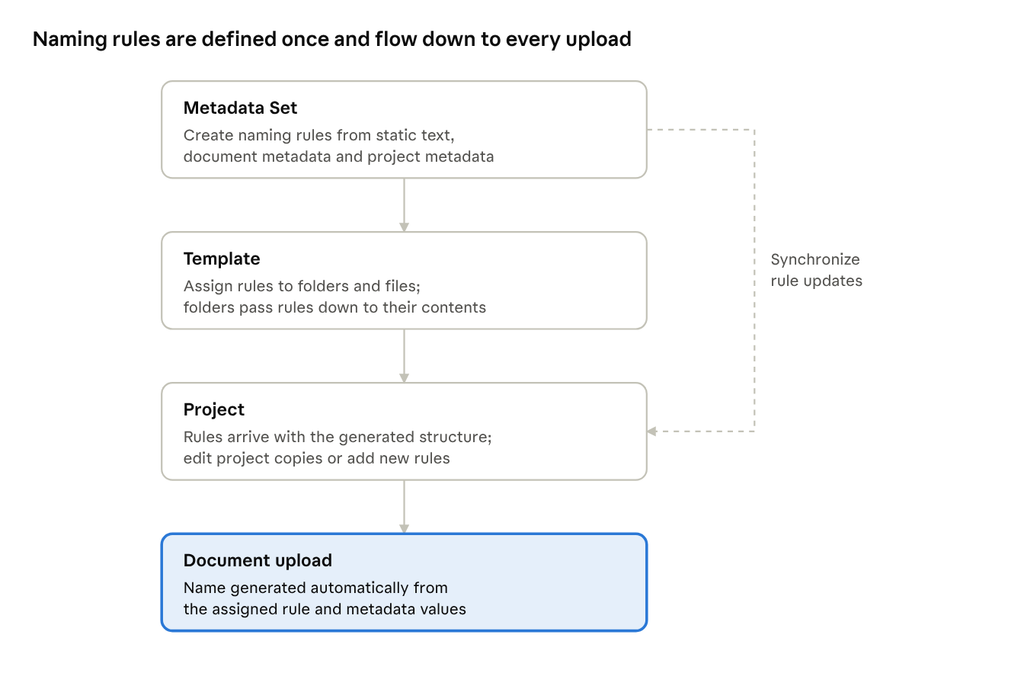
TMF Autonaming · from Metadata Set to document upload
Naming rules built from parts. A Document Naming Rule is a sequence of rule parts (static text, document metadata or project metadata) arranged in the order you need. For example, a rule can combine a fixed prefix, the study code from project metadata and the document type from document metadata.
Rules live in Metadata Sets. Administrators create and manage naming rules inside a Metadata Set, so a company-wide convention is defined in one place rather than re-built for each study.
Templates carry the rules. Rules are assigned to folders and files in a project template. A rule assigned to a folder is inherited by everything below it, so one assignment can cover a whole section of the TMF structure.
Projects get them automatically. When a TMF structure is generated from a template, the naming rules and their assignments come with it. At the project level, rules can be applied to folders, files and placeholders.
Study-specific flexibility. Project copies of inherited rules can be edited, and new project-only rules can be created without changing the original rules in the Metadata Set.
Synchronization keeps projects current. When a rule is updated in the Metadata Set, the change can be applied to existing projects, so naming configurations don’t drift apart over time.
Names are generated on upload. When a document is uploaded to a placeholder, its name is generated and updated automatically from the assigned rule and the document’s metadata values.
What It Gives You
The main change is simple: you stop naming documents and start defining how they should be named. Here is what that means day to day.
Less routine work. Users upload a document to its placeholder, and the name is generated automatically. No typing, no copying from a naming guide, no second pass to fix names.
One convention across every study. Because rules come from the Metadata Set through templates, all projects built on the same template name documents the same way. A document in one study looks just like its counterpart in another.
Fewer naming errors. Names are built from metadata values instead of being typed by hand, which removes typos, swapped fields and inconsistent abbreviations at the source.
Names that keep up with metadata. Since the name is generated from metadata values, it stays aligned with the document’s metadata rather than with whatever someone typed months ago.
Faster study setup. Naming rules arrive with the template. A new project starts with its naming convention already in place, so there is no need to configure rules from scratch for each study.
Room for study-specific needs. A sponsor or protocol needs a different format? Edit the project copy of a rule or add a new one. The company standard in the Metadata Set stays untouched.
Easy maintenance at scale. Change a rule once in the Metadata Set and synchronize it to existing projects, instead of updating each study by hand.
A TMF that’s easier to navigate and review. Predictable names make documents easier to find, check and hand over to monitors, auditors and inspectors.
| Who | What changes for them |
|---|---|
| TMF administrators | Define naming conventions once in the Metadata Set and roll them out through templates |
| Study and TMF teams | Upload documents without thinking about names; adapt rules for a specific study when needed |
| QA and inspection readiness | Fewer naming deviations to find and correct; a consistent structure to review |
| Sponsors and CROs running many studies | The same convention across the portfolio, maintained from one place |
Consistent Names, Built In
TMF Autonaming is available to Flex TMF users by default, with no activation needed. Define the rules once, let templates carry them into every study, and adjust them where a project needs it; the TMF takes care of the rest on every upload.
Autonaming is one step in our ongoing work on Flex TMF: we look for the manual, repetitive tasks in everyday TMF work and turn them into configured, automated processes. That way your team can focus on the quality and completeness of the TMF rather than on its housekeeping.